Camo Anti-Slip Silicone Grip Cover for Xbox Controller
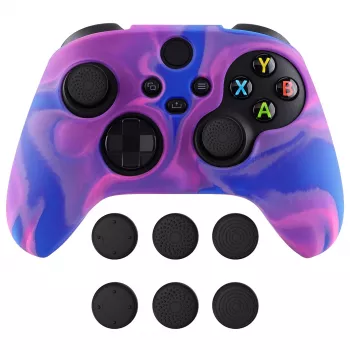
Camouflage Anti-Slip Silicone Grip Cover for Xbox Wireless Controller
A silicone grip cover can make a noticeable difference in comfort and control during long sessions—especially when hands get warm or sweaty. This camouflage anti-slip cover is designed to add traction, help reduce slips, and provide a layer of protection against everyday scuffs and minor bumps while keeping the controller’s familiar shape.
What a Silicone Grip Cover Changes During Play
Controllers are built to be durable, but the factory shell isn’t always ideal for every hand, room temperature, or play style. A well-fitted silicone cover upgrades the “contact points” between your palms and the grips without forcing you to relearn your controller.
- Adds surface traction to help reduce hand slip during fast inputs and longer sessions.
- Provides a slightly cushioned feel that can improve comfort without changing the controller’s overall size too dramatically.
- Offers a protective layer against light scratches, minor dings, and everyday wear from frequent handling.
- Improves grip consistency when hands are dry, warm, or slightly sweaty.
Fit and Compatibility to Confirm Before Buying
Xbox Wireless Controllers vary by generation (including versions with a Share button), and small differences in shell shape and cutout placement matter. A grip cover should feel “locked in” while leaving every control and port unobstructed.
- Confirm the controller model: Xbox Wireless Controllers can vary by generation, button layout, and share button presence.
- Check cutouts and clearance around: triggers, bumpers, battery door seam, and any rear buttons (if using an accessory).
- Ensure the cover does not interfere with thumbstick movement or rub against the stick base at full tilt.
- If using a charging dock, verify dock clearance—some docks require the controller’s original profile.
- For users with a headset adapter or chatpad, confirm accessory clearance around the bottom port area.
Quick Compatibility Checklist
| Item to check | Why it matters | What to look for |
|---|---|---|
| Thumbsticks | Avoids rubbing and reduced range | No contact at full stick tilt; smooth return to center |
| Triggers & bumpers | Prevents accidental drag or delayed actuation | Open cutouts with no silicone pressing on edges |
| Battery door seam | Ensures easy battery swaps | Cover doesn’t block the door latch or seam line |
| Ports & accessories | Keeps add-ons usable | Clear access to bottom port and accessory footprint |
| Charging dock fit | Maintains charging convenience | Controller seats fully without forcing |
Comfort, Texture, and the Camouflage Finish
Silicone covers vary more than they look. The best feel comes from a texture that grips without “grabbing” your hands, so you can reposition quickly and keep fine control during aiming or rapid movement.
- Texture choice matters: a subtle matte texture can improve grip without feeling sticky; deeper patterns can add traction but may collect lint more easily.
- Camouflage styling can help mask minor smudges and everyday handling marks compared with solid light colors.
- If sensitive to tacky finishes, look for a cover described as anti-slip rather than “gel-like” or overly soft.
- A properly fitted silicone cover should feel secure without shifting during quick flicks and repeated trigger pulls.
Camouflage is also practical for shared spaces: it tends to hide small scuffs and fingerprints that show up quickly on solid, glossy finishes.
Protection Benefits (and Realistic Limits)
A silicone cover is a “daily-driver” layer. It’s great for reducing the small wear that builds up over months of play, but it’s not a replacement for a travel case when the controller is tossed into a bag.
- Helps reduce cosmetic wear from rings, long nails, and repeated contact points on grips and back shells.
- Adds a buffer against minor bumps and short drops, but does not replace a hard case for travel.
- Can reduce the visibility of micro-scratches on glossy controller finishes by covering high-contact areas.
- Does not prevent liquid damage—spills still require immediate power-off, unplugging, and proper drying procedures.
For cleaning and device-care best practices, it helps to follow established guidance like Xbox Support’s recommendations for cleaning accessories and the CDC guidance on cleaning and disinfecting electronics.
Installation Tips for a Clean, Snug Fit
A clean install is the difference between “feels factory” and “feels fussy.” Take a minute to seat the silicone evenly so the cutouts line up and nothing presses against moving parts.
- Start by wiping the controller with a dry microfiber cloth so dust doesn’t get trapped under the cover.
- Align top cutouts first (around bumpers/triggers) and then stretch the silicone down over the grips.
- Press along edges and seams to seat the cover fully, ensuring buttons and sticks move freely.
- If the cover feels slightly misaligned, remove and re-seat rather than twisting it into place.
- Allow the cover to rest for a few minutes after installation so it settles into its final shape.
Cleaning and Care
Who It Suits Best
Price, Value, and What’s Included
Shop In-Stock Picks
- Camouflage Anti-Slip Silicone Grip Cover for Xbox Wireless Controller
- Premium 8-Piece Barber Cutting & Styling Kit for Real Hair Wigs
- No-Pull Reflective Adjustable Dog Harness with Easy Strap-On Design
FAQ
Will a silicone grip cover affect button presses or thumbstick movement?
A properly designed cover should use precise cutouts and avoid touching moving parts. After installation, push both thumbsticks to full tilt in every direction and test triggers/bumpers to confirm nothing rubs or feels partially pressed.
Can the cover be washed, and how often should it be cleaned?
Yes—silicone can typically be rinsed with lukewarm water, and mild soap helps remove oil buildup. Clean it whenever it starts to feel slick, looks dusty, or picks up lint, and let it dry fully before reinstalling.
Will it fit on an Xbox Wireless Controller with a charging dock?
Dock fit varies because some charging docks require the controller’s original profile. If the controller doesn’t seat and charge normally, remove the cover while charging or use a charging cable instead.









Leave a comment