17-Inch Waterproof Laptop Backpack for Travel & Work
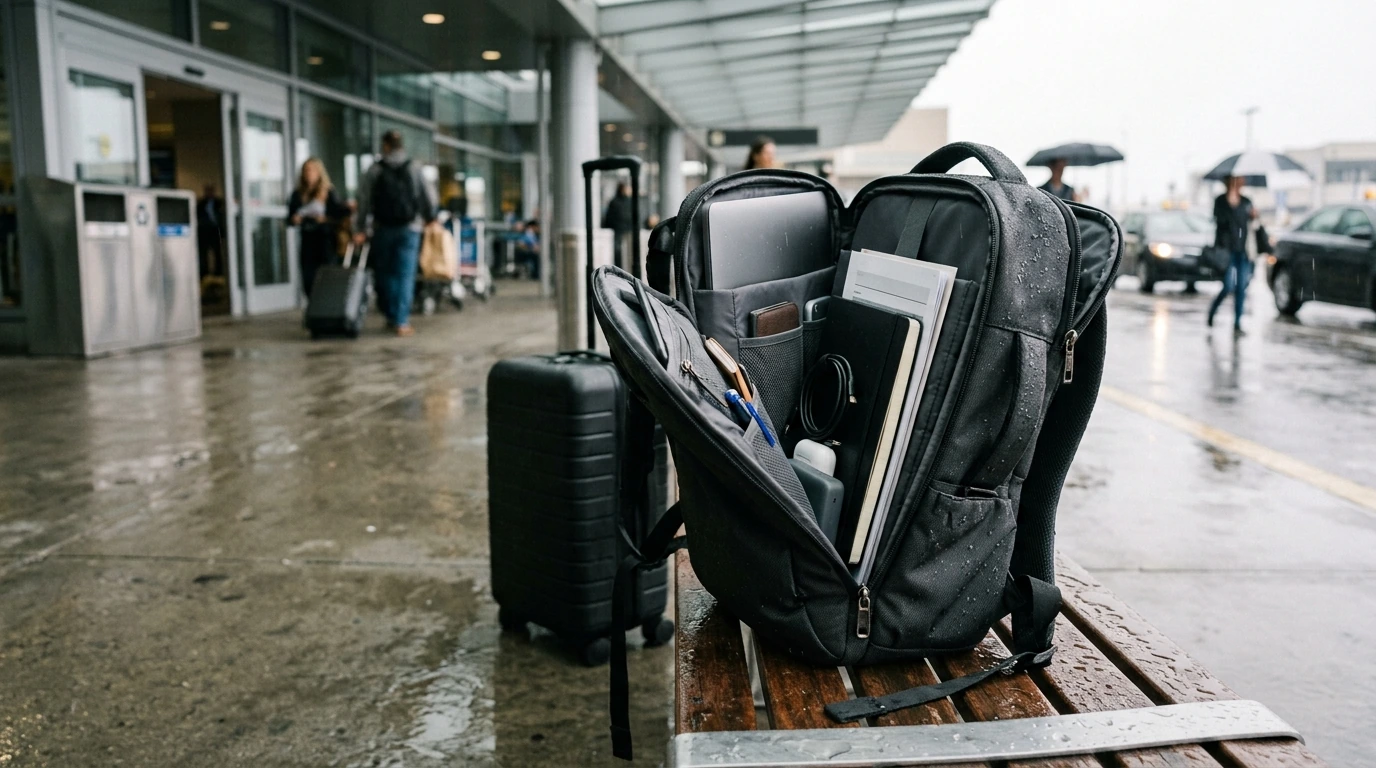
Waterproof 17″ Travel & Business Laptop Backpack with Multi-Pocket Design
A travel-and-work backpack needs to protect electronics, stay organized through busy days, and remain comfortable when fully loaded. The Waterproof 17″ Travel & Business Laptop Backpack with Multi-Pocket Design is built around a multi-pocket layout that separates tech, documents, and daily essentials while keeping quick-access items close at hand for commuting, flights, and meetings.
What this backpack is made to handle
Some days demand one bag that can move from curbside to gate to conference room without constant repacking. A 17-inch-capable laptop backpack is especially helpful when you’re carrying a larger device plus the extras that come with it.
- Business travel days that combine airport security, rideshares, and back-to-back meetings
- Commuting in rain or snow where a water-resistant exterior helps shield laptops and paperwork
- Carrying a larger laptop up to 17 inches along with chargers, cables, and accessories
- Keeping items separated so small gear doesn’t sink to the bottom of one large compartment
- Quick access to essentials like passport/ID, phone, earbuds, pens, and sanitizer
Multi-pocket organization that stays intuitive
Multi-pocket designs work best when they’re consistent: one place for tech, one for work tools, and a repeatable “grab zone” for things you need mid-transit. The goal is to stop digging and start moving—especially when lines are long and time is short.
- Dedicated laptop area designed for a larger device so it doesn’t press against bulky items
- Multiple pockets to split work items (documents, notebook, pens) from travel items (toiletries, snacks)
- Smaller accessory pockets for chargers, power bank, mouse, dongles, and USB cables
- Quick-reach pocket strategy: place items needed during transit in outer/upper pockets and everything else deeper
- Routine-friendly packing: keeping the same items in the same pockets reduces missed items at checkpoints
One practical approach is to designate pockets by “frequency”: items you touch every hour (phone, badge, earbuds) go outside; items you only need once (chargers, spare cables) go inside; and items you must protect (laptop, documents) stay in their dedicated sections.
Weather protection and what “waterproof” means day-to-day
In real life, “waterproof” usually means you’re covered for typical commutes—think puddle splashes, drizzle, and quick dashes through the parking lot—while still being mindful of the usual weak points like zippers and seams.
- A waterproof or highly water-resistant shell helps prevent light-to-moderate rain from soaking compartments
- Zippers, seams, and pocket openings are typical water entry points; packing electronics in the inner sleeve adds a second layer of protection
- For long exposure in heavy downpours, consider adding a compact rain cover or lining the laptop area with a thin waterproof pouch
- Drying after wet commutes: wipe exterior, open compartments, and air-dry to prevent odor buildup
- If carrying liquids, isolate them in a dedicated pocket or pouch to avoid internal leaks onto tech
If you travel with batteries and power banks, it’s also smart to keep them organized and accessible for screening. Reference guidelines from TSA and the FAA so you’re packing them in a compliant, easy-to-check way.
Comfort for heavy loads (and why it matters on travel days)
A backpack can have great storage and still feel wrong if the load rides low or pulls backward. Comfort becomes the deciding factor when you’re walking a terminal, standing in a security line, or crossing a city for a client meeting.
- A supportive back panel helps reduce pressure points during long walks through terminals or city blocks
- Adjust shoulder straps so the pack sits high enough to keep weight centered and avoid lower-back strain
- Balance left-to-right weight: keep heavier tech (laptop, charger) centered and close to the back
- Use pockets to distribute smaller items instead of stacking everything into one dense compartment
- When fully packed, periodically loosen and re-tighten straps to maintain fit as layers change
Size, capacity, and carry-on practicality
Pocket-by-pocket packing guide
Recommended packing layout for common trips
| Trip type | Laptop compartment | Main compartment | Quick-access pockets |
|---|---|---|---|
| Daily commute | Laptop + charger + small folder | Lunch, light layer, small pouch | Phone, keys, earbuds, transit card |
| Overnight work trip | Laptop + charger + adapters | 1 change of clothes + toiletries pouch | Passport/ID, boarding essentials, snacks |
| Conference day | Laptop + folder + badge lanyard | Jacket, giveaway items, water | Business cards, pens, gum, sanitizer |
Care and longevity tips
Product details and where to get it
- Model: Waterproof 17″ Travel & Business Laptop Backpack with Multi-Pocket Design
- Built for: commuters, business travelers, students with larger laptops, and anyone who carries tech daily
- Price: $159.01 (USD), subject to change
- Availability: in stock
- Best use cases: rainy commutes, organized work carry, airport days where quick-access pockets save time
Other in-stock picks
- No-Pull Reflective Adjustable Dog Harness with Easy Strap-On Design
- Premium 8-Piece Barber Cutting & Styling Kit for Real Hair Wigs
- Cozy Velvet Winter Pajama Set for Boys
FAQ
Will a 17-inch laptop fit comfortably without pressing into other items?
Yes—this style is built around a 17-inch laptop space. For the best fit, keep bulky items (like toiletry kits or thick power bricks) in the main compartment and reserve the laptop area for the device and other flat items to minimize pressure.
Is it safe to use in heavy rain?
It can handle rain and splashes well, but prolonged exposure in heavy downpours may still challenge zippers and seams. For extended time outdoors, add a compact rain cover or place the laptop in a waterproof sleeve for extra protection.
How should the pockets be used to stay organized while traveling?
Use a simple repeatable system: tech in the dedicated laptop area, accessories grouped in one pocket, documents in a flat pocket, and transit essentials in quick-access pockets. Keeping the same layout trip after trip makes packing faster and reduces forgotten items.









Leave a comment