Ultra-Slim 2.4G USB Wireless Mouse for Travel Work
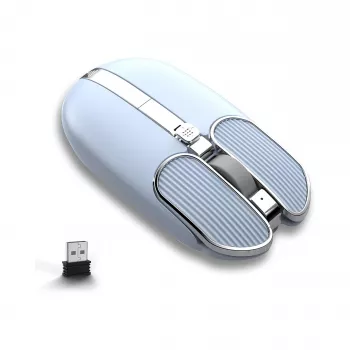
Ultra-Slim Wireless USB Mouse for Portable, Plug-and-Play Productivity
A lightweight mouse that slips easily into a laptop sleeve can make everyday work feel smoother—especially when touchpads fall short for spreadsheets, design tweaks, and long browsing sessions. This ultra-slim 2.4G wireless USB mouse is built for portable setups: quick plug-and-play use, reliable wireless control, and a low-profile shape that travels well between home, office, and on-the-go workstations.
Why an ultra-slim wireless mouse fits modern portable setups
Portable work has changed what “comfortable” looks like. Instead of a full desktop station every day, many people rotate between kitchen counters, shared desks, libraries, and café tables. An ultra-slim mouse supports that reality without taking over your bag.
- Keeps a bag or laptop sleeve tidy with a low-profile body that’s easy to pack.
- Supports a more natural hand and wrist position than constant touchpad use for many tasks.
- Reduces cable clutter on small desks, café tables, and shared workspaces.
- Makes quick transitions easier between laptop-only work and a more comfortable “mini desk” setup.
If you’re tightening up posture and desk habits, it can help to follow established ergonomics guidance for workstation setup and movement breaks, like the resources from NIOSH.
What 2.4G wireless with a USB receiver means day to day
“2.4G wireless” typically refers to a small USB receiver that creates a dedicated connection between the mouse and your computer. The main advantage is speed and simplicity: you plug in the receiver and start working—no pairing screens, no settings hunt.
- Plug-and-play connection through a USB receiver for fast setup without pairing menus.
- Stable performance for typical office workflows like documents, tabs, and light creative work.
- Good option for shared computers where Bluetooth pairing may be restricted.
- Practical for travel: connect, work, unplug, and store without changing system settings.
| Feature | USB Receiver (2.4G) | Bluetooth |
|---|---|---|
| Setup speed | Usually instant plug-and-play | Requires pairing steps |
| Port needed | Uses a USB-A port (or adapter) | No receiver needed |
| Best for | Shared PCs, simple setup, consistent connection | Minimal ports used, tablets and modern laptops |
| Switching devices | Often single-device unless multi-receiver | Many models support multi-device switching |
Bluetooth is great when you’re protecting scarce ports, but receiver-based wireless stays popular for a reason: it’s straightforward. For background on how Bluetooth connections work across devices, the Bluetooth SIG is a useful reference point.
Comfort and control: shape, clicks, and everyday precision
Ultra-slim mice are designed to travel first and foremost. That usually means a flatter grip and a low profile that disappears into a sleeve—ideal for commutes, campus days, and flexible desk setups.
- Ultra-slim designs tend to encourage a flatter grip; ideal for short-to-medium sessions and travel days.
- Click feel matters for productivity: consistent left/right clicks help reduce mis-clicks during fast work.
- Scroll control is important for long pages, spreadsheets, and code; look for steady, predictable scroll steps.
- For best accuracy: use a mouse pad or a consistent surface; glossy tables can reduce tracking quality.
A simple upgrade is to keep a thin mouse pad in the same pocket as your charger. It takes almost no space, and it can make cursor movement feel more consistent across unfamiliar surfaces.
Portable reliability tips: travel, storage, and battery habits
Wireless convenience is at its best when a few small habits are dialed in—especially if you tend to work in different places throughout the week.
- Keep the USB receiver stored safely (a small pouch helps prevent loss in transit).
- Use a stable surface on the go; a thin foldable mouse pad can improve tracking in cafés and airports.
- Turn the mouse off when packing to help conserve battery during travel days.
- Clean the underside occasionally to remove dust that can affect smooth movement.
If the cursor ever feels “floaty” or inconsistent, check the basics first: surface glare, debris near the sensor area, and whether the receiver is fully seated in the port (or in a reliable hub).
Product spotlight: Ultra-Slim Wireless USB Mouse – Portable 2.4G Computer Mouse
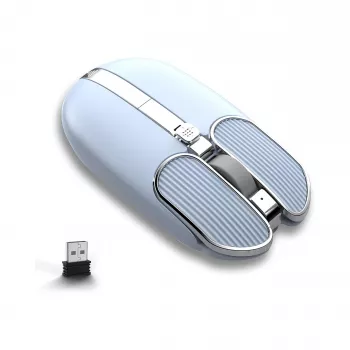
If the goal is a compact, easy-to-carry mouse that’s ready the moment you plug it in, the Ultra-Slim Wireless USB Mouse – Portable 2.4G Computer Mouse is a practical, budget-friendly option for everyday tasks. It’s designed for portable setups where space is limited but cursor control still matters.
| Item | Details |
|---|---|
| Name | Ultra-Slim Wireless USB Mouse – Portable 2.4G Computer Mouse |
| Price | 15.97 USD |
| Availability | In stock |
| Product page | View product |
Who it’s best for
Simple setup checklist
More in-stock picks to round out a compact, travel-ready setup
- No-Pull Reflective Adjustable Dog Harness with Easy Strap-On Design for safer, more comfortable walks—especially useful when travel days include extra time outside.
- Premium 8-Piece Barber Cutting & Styling Kit for Real Hair Wigs for quick touch-ups and tidy grooming at home or on trips.
FAQ
Will a 2.4G USB wireless mouse work with a laptop that only has USB-C ports?
It will work as long as you can connect the USB receiver. Use a USB-C to USB-A adapter or a USB-C hub, then it should remain plug-and-play.
Is an ultra-slim mouse comfortable for long work sessions?
Ultra-slim designs are excellent for portability and short-to-medium sessions. For all-day use, comfort depends on hand size and grip style, so it can help to take breaks or switch to a more contoured mouse if needed.
Why does my mouse sometimes track poorly on certain tables?
Some surfaces are too glossy, reflective, or uneven for consistent sensor tracking. A mouse pad or matte surface usually improves control, and cleaning dust from the underside can also help.








Leave a comment